顯示具有 laravel 標籤的文章。 顯示所有文章

2016年12月11日 星期日

Laravel 5 Dynamically create Eloquent Models

php

namespace App\Models;

use Illuminate\Database\Eloquent\Model;
use Sofa\Revisionable\Laravel\RevisionableTrait;
use Sofa\Revisionable\Revisionable;

class Dynamic extends Model implements Revisionable
{
    use RevisionableTrait;

    /**
     * @param $table
     */
    public function __construct($attributes = [])
    {
        parent::__construct($attributes);
    }

    /**
     * Dynamically set a model's table.
     *
     * @param  $table
     * @return void
     */
    public function setTable($table)
    {
        $this->table = $table;

        return $this;
    }
}

from : http://stackoverflow.com/questions/34700373/laravel-5-dynamically-create-eloquent-models

Use Schema::hasTable outside laravel

use Illuminate\Database\Capsule\Manager as Capsule;
use Illuminate\Database\Schema\Blueprint;

Capsule::schema()->hasTable

2016年12月1日 星期四

Multiple authentication guard drivers (including API) in Laravel 5.2

Let's get back to Laravel 5.2 features, shall we? 5.2 introduced a significant boost to the power of the entire authentication system, including making it much simpler to have multiple "guards" running at once.

Why should you care? #

The default authentication guard in Laravel prior to 5.2 (now named the web guard) is your traditional web-based application authentication layer: username and password post to a controller, which checks the credentials and redirects if they are invalid; if valid, the user information gets saved to the session. Not all of those pieces are absolutely necessary but that's the general mindset.
But what if you want to have an API running in the same app, and it uses JSON web tokens (or some other stateless, non-session authentication mechanism)? In the past you'd have to jump through a lot of hoops to have multiple authentication drivers running at the same time.

Laravel 5.2's default auth guards #

In 5.2, not only is it simple to have multiple auth drivers running, it actually already works that way out of the box.
If you check config/auth.php, you'll see two guards set out of the box: web, which is the classic Laravel authentication layer, and api, which is a stateless (no session memory) token-based driver.
Both, as you can see, connect to the same "provider".
Auth providers are also customizable. They're the definition of how the system should store and retrieve information about your users. Each is defined by an instance of Illuminate\Contracts\Auth\UserProvider.
    'guards' => [
        'web' => [
            'driver' => 'session',
            'provider' => 'users',
        ],

        'api' => [
            'driver' => 'token',
            'provider' => 'users',
        ],
    ],
If you look up higher in config/auth.php, you can see that the default Auth guard will be "web". That means any time you use Auth functions, middleware, or façades inside your application, they will default to the web guard unless you explicitly specify otherwise.

Introducing the token auth driver #

So, if web uses the classic session driver, what's this new token driver we're seeing powering the apiguard?
Jacob Bennett has written a fantastic post on that already: API Token Authentication in Laravel 5.2.
Check out his post to learn more about how it works, but here's the short of it:
  • Add an api_token column to your users table. 60-character string, unique.
  • Instead of using the auth middleware in your route definition, use the auth:api middleware.
  • In your API routes, use Auth::guard('api')->user() to get your user instead of Auth::user().
As you can see, we need to store an api_token for each user, and every incoming request that's guarded by the token-driven api guard will require a query parameter named api_token with a valid API token set to authenticate that user. And since it's stateless, every request will need to have this API token set; one successful request won't affect the next request.
If you're not familiar with token-based authentication, the consuming application (e.g. an iOS application) will have gotten, and saved, the token for the authenticating user prior to this request, so it will be creating its API calls using that known token as a part of the URL. For example, an iOS app might want to get a list of its user's friends; when the user first authenticated the application with your web site/API the app received a token and stored it. Now, it will generate requests using URLs like this: http://yourapp.com/api/friends?api_token=STORED_TOKEN_HERE

Using non-default drivers #

As you can see in the token example above, there are two primary places we're going to be using drivers other than the default: in the auth guard middleware, and when we're using convenience features like Auth::check() and Auth::user() in our code.
You can choose which guard you're using to protect your routes by adding a colon and the guard name after auth in the middleware key (e.g. Route::get('whatever', ['middleware' => 'auth:api'])).
You can choose which guard you're calling manually in your code by making guard('guardname') the first call of a fluent chain every time you use the Auth façade (e.g. Auth::guard('api')->check()).

Creating your own guards and drivers #

Creating your own guard is simple, beause each guard is just a key (web, api) that points to a specific configuration of a driver (session, token) and a provider (users). They're configured, as mentioned above, in config/auth.php:
    'guards' => [
        'web' => [
            'driver' => 'session',
            'provider' => 'users',
        ],

        'api' => [
            'driver' => 'token',
            'provider' => 'users',
        ],
        'matts-fancy-api-guard' => [
            'driver' => 'token',
            'provider' => 'users',
        ],
    ],
But as you can tell, that doesn't really do much unless you're changing the driver or the provider.
Creating your own driver is not quite as simple as creating your own guard. The docs have a spot about Creating your own auth driver, and you're essentially going to be creating your own implementation of Illuminate\Contracts\Auth\Guard and then registering it as a driver in a service provider somewhere.

Concludinal #

That's it. Enjoy.

from : https://mattstauffer.co/blog/multiple-authentication-guard-drivers-including-api-in-laravel-5-2

2016年11月26日 星期六

The auth scaffold in Laravel 5.2

If you're like me, many of the applications you build in Laravel have a similar Saas-type framework: user signup, user login, password reset, public sales page, logged-in dashboard, logout route, and a base Bootstrap style for when you're just getting started.
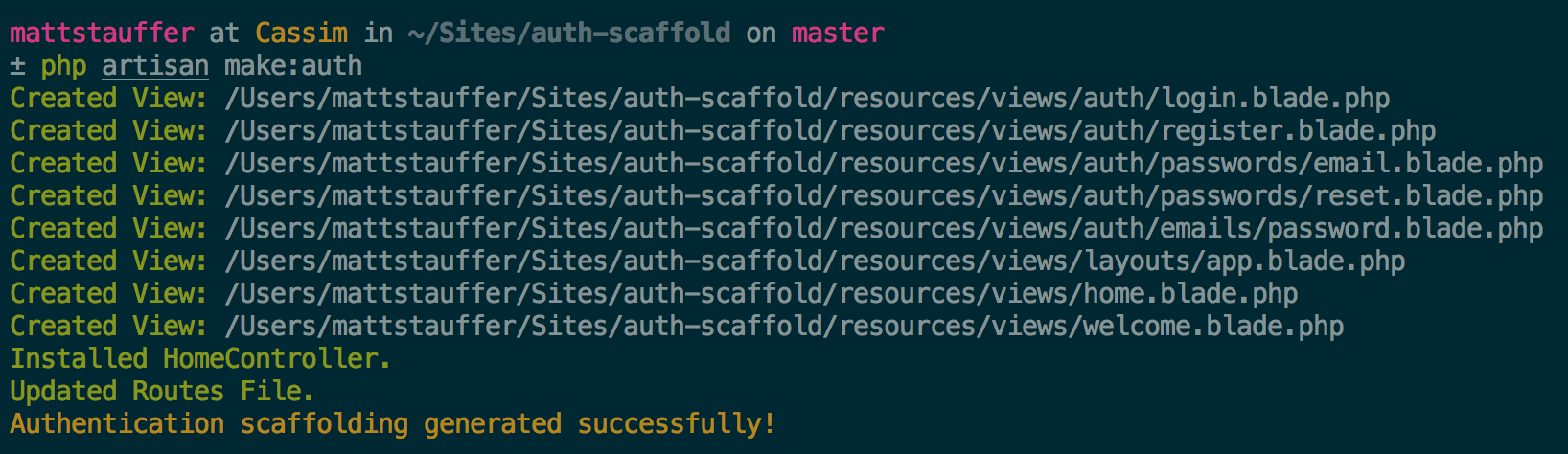
Laravel used to have a scaffold for this out of the box. It disappeared recently, to my great chagrin, but it's now back as an Artisan command: make:auth.
Command line output of artisan make:auth
What does it provide? Let's dig in.

What changed? #

We have a layout (resources/views/layouts/app.blade.php) that is the core of this scaffold, and then a series of views that extend it:
  • welcome.blade.php - the public welcome page
  • home.blade.php - the dashboard for logged-in users
  • auth/login.blade.php - the login page
  • auth/register.blade.php - the register/signup page
  • auth/passwords/email.blade.php - the password reset confirmation page
  • auth/passwords/reset.blade.php - the password reset prompt page
  • auth/emails/password.blade.php - the password reset email
Our public page is still routed via routes.php:
Route::get('/', function () {
    return view('welcome');
});
And we now have a HomeController, which routes our dashboard:
class HomeController extends Controller
{
    /**
     * Show the application dashboard.
     *
     * @return Response
     */
    public function index()
    {
        return view('home');
    }
}
This is of course routed in routes.php in the web group. And notice that there's something else new there: The Route::auth() method:
Route::group(['middleware' => 'web'], function () {
    Route::auth();

    Route::get('/home', '');
});

Route::auth() #

The auth() method is a shortcut to defining the following routes:
// Authentication Routes...
$this->get('login', '');
$this->post('login', '');
$this->get('logout', '');

// Registration Routes...
$this->get('register', '');
$this->post('register', '');

// Password Reset Routes...
$this->get('password/reset/{token?}', '');
$this->post('password/email', '');
$this->post('password/reset', '');

The frontend #

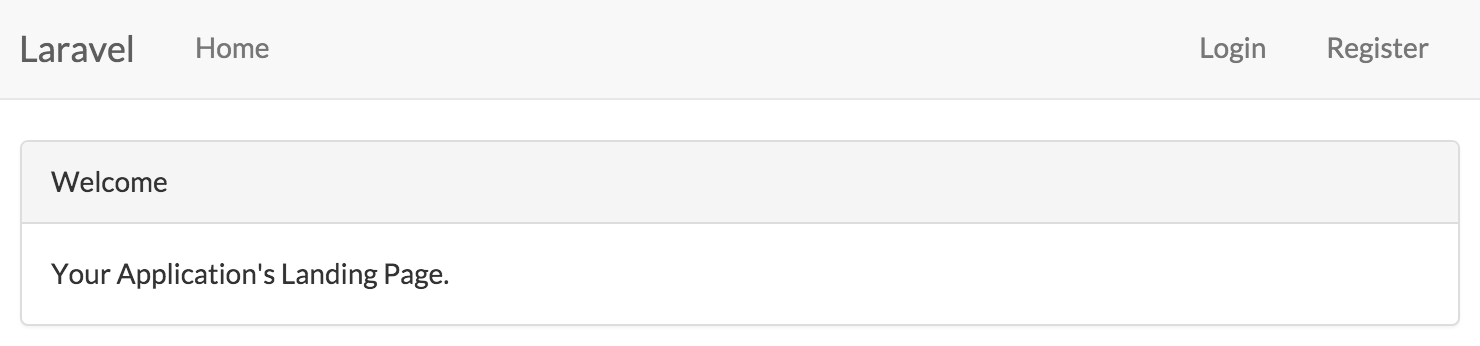
Now let's take a look at what we get in the browser:
Screenshot of the output from a default auth scaffold view
As you can see we have Bootstrap CSS, a basic Bootstrap app layout, and helpful to our basic auth actions.

App.blade.php #

So what does this master layout look like?
We get FontAwesome, the Lato font, Bootstrap CSS, a basic hamburger-on-mobile responsive layout, jQuery, Bootstrap JS, and placeholders that are commented out for the default output CSS and JS files if you choose to use Elixir.
We also have a top nav that links us home, and links guests to either login or register, and links authenticated users to log out.

Conclusion #

That's it! It's not anything complex, but it's 30-60 minutes of typing that you just saved on every app that needs it.

from : https://mattstauffer.co/blog/the-auth-scaffold-in-laravel-5-2

2016年11月25日 星期五

Middleware groups in Laravel 5.2

When you are creating a site of any significant size in Laravel, your routes file will often get pretty large. One of the first things I do in a new site is group my routes by logically distinct sections like "admin", "auth", "public". Usually each of these groups get their own set of middleware—admin, for example, gets auth. Maybe the API group gets a different auth middleware, and it might get an API-specific rate limiter or something else.
Laravel 5.2 has introduced something called middleware groups, which are essentially a shortcut to applying a larger group of middleware, using a single key.
Note: Even if you don't want to use the middleware "shortcuts" aspect of middleware groups, you should read on, because this is a big change to Laravel's global middleware stack.
So remember my admin example above? We can now create an "admin" middleware group. Let's learn how.

Defining middleware groups #

You can define middleware groups in app\Http\Kernel.php. There's a new property named $middlewareGroups that's an array; each key is a name and each value is the corresponding middleware.
Out of the box, it comes with web and api:
protected $middlewareGroups = [
    'web' => [
        \App\Http\Middleware\EncryptCookies::class,
        \Illuminate\Cookie\Middleware\AddQueuedCookiesToResponse::class,
        \Illuminate\Session\Middleware\StartSession::class,
        \Illuminate\View\Middleware\ShareErrorsFromSession::class,
        \App\Http\Middleware\VerifyCsrfToken::class,
    ],

    'api' => [
        'throttle:60,1',
    ],
];
As you can see, the keys can reference either a class or a route-specific middleware shortcut like throttle or auth. Let's make an admin group:
protected $middlewareGroups = [
    'web' => [...],
    'api' => [...],
    'admin' => [
        'web',
        'auth',
    ]
];
We've defined that the admin is a group that uses web (another group) and auth (a named route middleware). That's it!

Changes from 5.1 #

You might notice that the middleware in web are those that used to be applied to every route in Laravel 5.1 and before. That's a pretty big shift in thinking, so please take note of that: anything that's not given a web middleware will not have cookies or session or CSRF functional.
That also means we have a lot more flexibility, though: it frees us up to have more stateless API layers that aren't giving us the convenience of cookies and sessions. We can get rid of most of the universal middleware—if you take a look, the only universal middleware in 5.2 is the "check for maintenance mode" middleware.
Note as well that any APIs that rely on cookies or sessions (or CSRF) will not work if they're stuck under this api group, so if you have stateful APIs, you'll need to make some tweaks to this default apigroup.

Using middleware groups #

OK, so we know how to define a middleware group. How do we use it?
It'll be clear when you look at the default routes.php in 5.2:
Route::get('/', function () {
    return view('welcome');
});

Route::group(['middleware' => ['web']], function () {
    //
});
As you can see, you use it just like any route middleware like auth: just put the key either as the direct value of middleware, or in an array that's the value of middleware. So, here's our admin middleware group in use:
Route::group(['middleware' => 'admin'], function () {
    Route::get('dashboard', function () {
        return view('dashboard');
    });
});
That's it! Enjoy!
Note: Later in Laravel 5.2, all routes in routes.php are now wrapped with the webmiddleware group by default. I'll try to write that up more later, but take a look at the RouteServiceProvider to see how it's all working.

from : https://mattstauffer.co/blog/middleware-groups-in-laravel-5-2

wibiya widget